


Amazon A to Z
4.115.84K Reviews
App Specs
- Version
- 6.0.1358.0
- Updated On
- License
- Free
- Downloads
- 5,000,000+
- Developer
- Amazon Mobile LLC
- Categories
- Business
- Platform
- Android, iOS
Screenshots


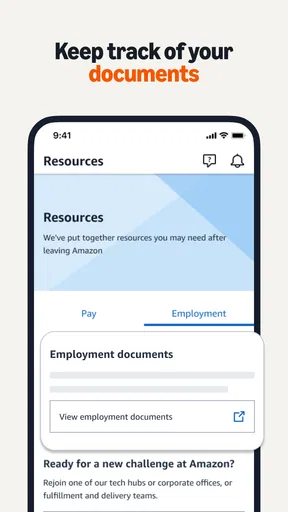

 Analysis by AppCompare
When I consider a work app that brings schedules, pay information and workplace updates together, my first question is whether it makes routine tasks easier without asking me to treat it as a replacement for every conversation with a manager or HR. Amazon A to Z is a free business app from Amazon Mobile LLC, intended for people who work at Amazon. It has an average rating of 4.1 from around 96,000 ratings, and more than 5 million installs. Its Everyone age rating makes it broadly suitable from a store-rating perspective, but the app’s practical audience is much narrower: it is useful when you have an Amazon work account and a reason to manage work matters on your phone.
Trust starts with the app’s purpose
I see this as a work portal rather than a general-purpose organizer. That distinction matters. It brings work-related tasks into one place, but it is not a personal calendar for every part of life, nor is it a substitute for your own records. Because the information it handles can include schedules, pay stubs and tax details, I would use it deliberately: check the item I need, make a note of anything important, then sign out or secure my phone as I normally would for an account containing work information.
The app’s developer is Amazon Mobile LLC, and the current version is 6.0.417.0, with Android 7.0 as the minimum operating-system requirement. Those details help identify the app and the devices it can run on; they do not, on their own, tell me how any particular account is configured. I would rely on the sign-in and account choices shown on my own device rather than assume that another employee’s setup will look identical.
Work tasks in one place, with sensible boundaries
When you think about managing your work-life balance, especially if you're part of the Amazon family, Amazon A to Z has you covered. This app is like your personal assistant, only it doesn’t require you to feed it or listen to its complaints about overtime. Let me walk you through my experience with this nifty tool.
The All-in-One Solution
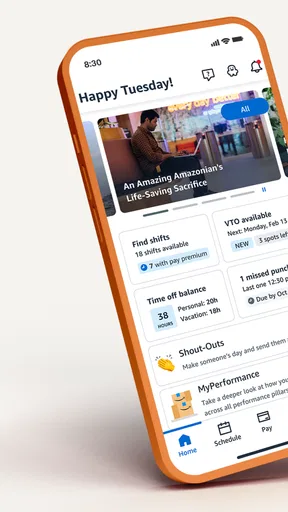
First off, if you’re an Amazon employee, Amazon A to Z is your go-to app for managing just about everything related to work. From checking your schedule to accessing your pay stubs, this app is designed to keep things as simple as ordering your favorite gadget online. And let's be honest, who doesn’t love simplicity?
Features That Make Life Easier
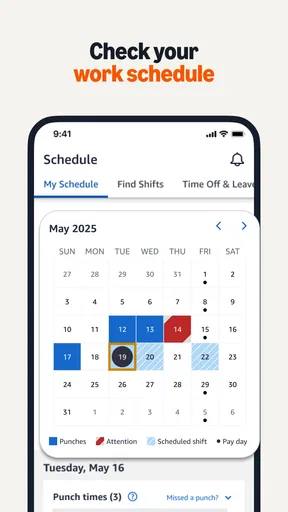
One of the standout features of this app is the ability to view your schedule. Forget about those moments of panic when you can’t remember if you’re supposed to be at work today—this app has your back. Just a couple of taps and bam, you know if you can hit that snooze button again.
Another cool feature is the ability to request time off. Need a break? Want to plan a getaway? No problem. You can easily request time off without having to jump through hoops. It’s as straightforward as ordering another batch of those delicious Amazon snacks.
Worth Reading Before You Choose

Flipboard Shows What News Apps Must Do Beyond the Feed

Switching to Android Auto Means Rethinking Your Driving Routine

Google Calendar Makes a Crowded Week Easier to Manage

Ludo King Makes the Most of the Minutes Between Plans

Baby Panda World Brings Quick Play to Modern Phones, but Its Game Library Feels Busy

ESPN’s Live Game View Makes Following Close Games Easier
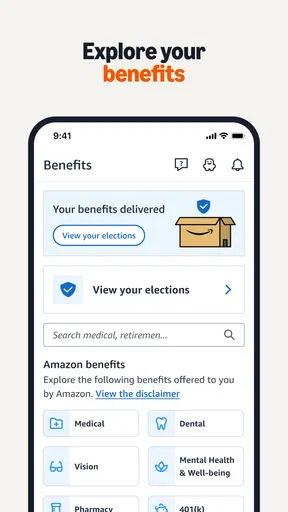
And let's talk about pay. With Amazon A to Z, you can effortlessly check your pay stubs and even view your tax info. It’s like having a mini HR department right in your pocket. Plus, the app keeps you informed about any updates or changes in policies, so you’re always in the loop.
Using it without losing track
There is a practical difference between seeing a schedule and making a reliable plan around it. I would check the app when arranging childcare, a commute or an appointment, then confirm any change that could affect those plans rather than relying on a notification alone. That small habit is useful because a phone alert can be missed, dismissed or arrive at a busy moment. The app can help me see work information; I still need to pay attention to whether the information has changed.
For time-off requests, I would treat the in-app request as the start of a process, not proof that the time is approved. After submitting one, I’d return to the relevant screen to check its status and keep an eye out for a response. This is a better workflow than booking travel on the assumption that a request has already been accepted. It also gives me a clear point to follow up through the appropriate workplace channel if the status is unclear or the timing is urgent.
Pay and tax information is another reason to be thoughtful about when and where I open the app. If I’m checking a pay stub in a shared space, I’d avoid leaving the screen visible and would close it when finished. If I need to compare a figure later, I’d keep only the notes I actually need in a place I consider appropriate, instead of assuming that the app should serve as my long-term personal filing system. The useful trade-off is convenience against the care required when viewing sensitive work details on a phone.
User-Friendly Design
The app’s interface is sleek and intuitive. Even if you're not tech-savvy, you’ll find it easy to navigate. The menus are straightforward, and the layout is clean. It’s almost like they hired a team of mind readers to design it because it just makes sense.
One of the things I appreciate is the notifications feature. You can customize what you want to be alerted about, ensuring you never miss an important update. It’s like having a friendly nudge from a coworker, reminding you of that upcoming meeting or shift change.
Notifications and personal control
Notification choices are most helpful when they reduce interruptions instead of multiplying them. I’d start with the alerts that affect near-term work decisions, then adjust if routine announcements make the phone feel noisy. A notification is a prompt to check the app, not necessarily the full context of a policy update or schedule change. For something consequential, I’d open the relevant item and read it there rather than relying on the short message shown on the lock screen.
That approach also gives the user a more deliberate way to manage privacy. A phone can display notifications where other people might see them, so I would review which alerts I want surfaced and use the device’s own screen-lock settings. These are practical precautions, not a claim about a particular permission or privacy policy. I prefer to make choices based on controls I can actually see on my device instead of assuming what the app collects or how an account is handled behind the scenes.
Staying Connected
If you’re working at Amazon, communication is key, and this app ensures you’re never out of the loop. Whether it’s connecting with your team or staying updated on company news, Amazon A to Z has got you covered. It’s like having your own personal newsroom, delivering updates right to your phone.
And the help feature? Absolutely fantastic. If you ever find yourself stuck or unsure about something, the app provides a helpful guide and FAQs that walk you through common issues. It’s like having a tech-savvy friend on speed dial.
Where it fits among everyday alternatives
Compared with a personal calendar, a notes app or a paper planner, this work app’s main advantage is that it brings Amazon-specific work tasks together rather than asking me to copy everything by hand. A calendar can be better for combining shifts with family plans, appointments and commitments from other jobs. A paper note can be easier when I want a quick reminder without opening a work account. I would not try to force one tool to do the other’s job: I’d check work details in the work app, then put only the planning information I need into my usual personal system.
That division is particularly useful for someone juggling variable shifts. For example, I might check the week’s schedule before arranging a ride, then use my calendar to block out the time and add a reminder to recheck the work app before leaving. If I’m considering time off, I’d submit the request first and wait for a clear outcome before treating those dates as settled. This simple sequence avoids a common planning mistake: confusing a request with an approval or an old view with the latest schedule.
It is less compelling for someone who does not work at Amazon, or for an employee who wants one app to organize every employer, household commitment and personal document. The app’s focus is also a limitation: it is most useful when the work information you need is available through your account. If an issue requires a detailed conversation, or if something seems wrong with a pay or schedule entry, I would use the appropriate workplace support route rather than expect an app screen to resolve every question.
Final Thoughts
Overall, the Amazon A to Z app is a game-changer for Amazon employees. It streamlines all essential work-related tasks into one user-friendly platform. Whether you're managing your schedule, checking your pay, or staying informed, this app makes it all feel effortless.
So, if you're part of the Amazon crew and haven't tried this app yet, what are you waiting for? Give it a go and see how it transforms your work routine. Trust me, once you start using it, you’ll wonder how you ever managed without it.
Who I’d recommend it to
I’d recommend it most to Amazon employees who routinely need to check shifts, handle time-off requests or access pay and tax information while away from a computer. For a worker who checks a schedule before a commute or wants workplace updates on a phone, having those tasks close together can save time and reduce the need to hunt through separate channels. Its free price also makes it easy to try if you already have a work account and a compatible Android device.
I’d be more cautious if you are mainly looking for a general calendar, a personal finance tool or a universal employee app. Those alternatives may suit broader needs better, especially if you need to bring information from several employers into one view. The choice is less about which app has the longest feature list and more about whether your daily tasks are specifically tied to Amazon work. For that focused purpose, this is a practical companion; outside it, the reason to install it is limited.
If you are deciding whether it will work on your phone, the listed minimum is Android 7.0, and the app is free. If you are deciding whether it is appropriate for your age group, its content rating is Everyone, though its work-focused functions are meant for Amazon employees. The store rating is positive overall, but I would treat ratings as a broad impression rather than a guarantee that every account, device or workplace situation will behave the same way.
A careful, useful work companion
My cautious verdict is that this app earns its place when it saves an Amazon employee from switching between scattered work resources for ordinary checks. Its strongest value is practical access to work-life tasks, not replacing human support or a personal planning system. I would keep my account secure, adjust visible alerts to suit my surroundings, verify time-sensitive details in the app, and follow up through the proper channel when a decision needs confirmation.
That balance is why I’d suggest trying it if your Amazon role makes these checks part of the week. It can make routine work administration feel more manageable, while still asking you to use good judgment around personal information and important decisions. If you want a broad organizer for life beyond Amazon, choose a tool built for that instead; if you need a focused way to keep up with Amazon work matters, this is a sensible place to start.
Pros
- User-friendly interface for easy navigation.
- Real-time updates on work schedules.
- Direct communication with management.
- Access to pay and benefits information.
- Shift swapping and time-off requests.
Cons
- Limited features compared to desktop version.
- Occasional login issues reported.
- Notifications can be overwhelming.
- Requires frequent updates for smooth operation.
- Limited offline functionality.
FAQs for Amazon A to Z
What is Amazon A to Z?
Amazon A to Z is an app designed specifically for Amazon employees to manage their work-related activities efficiently. It provides features such as scheduling, time-off requests, pay details, and important company announcements. This app is a centralized platform aimed at enhancing the work experience for Amazon staff by offering easy access to essential information.
How do I access my work schedule on Amazon A to Z?
To access your work schedule in Amazon A to Z, simply log into the app with your Amazon employee credentials. Navigate to the ‘Schedule’ section where you can view your upcoming shifts, swap shifts with coworkers, and request changes. The app makes it easy to stay updated on your work commitments at any time.
Can I request time-off through the Amazon A to Z app?
Yes, the Amazon A to Z app allows you to request time-off directly from within the app. Go to the ‘Time-Off’ section, select the type of leave you need, and submit your request. You can track the status of your request and receive notifications on approvals or any necessary adjustments.
Is my personal information secure in the Amazon A to Z app?
Amazon A to Z prioritizes the security of your personal information. The app employs robust security measures to protect your data, including encryption and secure authentication processes. It’s important to keep your login credentials confidential and update them regularly to enhance security further.
What should I do if I encounter technical issues with Amazon A to Z?
If you experience technical issues with Amazon A to Z, first try restarting the app or your device. If the problem persists, check for app updates and install them if available. For further assistance, contact your HR department or use the app’s help section to reach technical support for troubleshooting.


